1
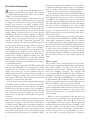
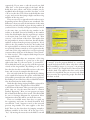
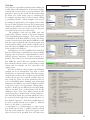
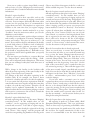
In version 1.4 the registering of colour rings has been
considerably expanded. A variable in the data table has
been defined for this, and the comments field should
no longer be used. If you register that a bird is marked
with colour rings in addition to a metal ring, there will
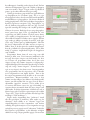
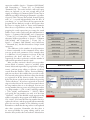
appear a field called “Colour code”. Key on this and a
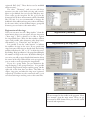
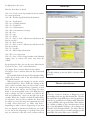
new form will appear for either neck ring or foot ring.
On the left side all colours are listed, and on the right all
rings on the bird are specified. For foot rings there can
be rings both over and under the tarsus, up to 6 rings
per leg. You may either write the code directly into the
fields or use the colours on the left side. Register the
colour and then on the ring where it shall be placed.
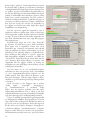
If this is a coded ring, press on the ring and you must
specify the initials and the colour of the initials. The
program will itself generate the code according to the
type of ring that is placed on the bird. Remember that
the metal ring must also be placed before the code is
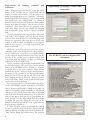
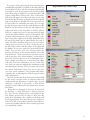
valid. In order to facilitate the process you can remove
colours that you do not use. Press on the buttons to
the left of the colours, and the colour on the right will
be hidden. If you press again the colour will become
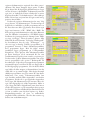
visible. You can also store your selected colours by
pressing the button at the bottom marked “Store this
colour selection”. In the same way you can store a colour
code by pressing “Store colour template” on the right of
the screen. You can also here store an incomplete code.
If for example you always use a metal ring and a blue
code ring, then this combination can be stored. The
next time you open this module this combination will
automatically be entered. Then you must only specify
the initials and initial colour. You can at any time
store new colour templates. The program will always
remember the stored templates, both as regards colour
and combinations.
The new system is based on an international standard
for the storage of colour codes. It comprises almost all
combinations and placement of colour rings. A great
advantage, compared to previously, is that all can
interpret colour combinations that others have used on
their birds.
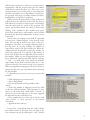
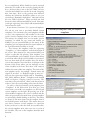
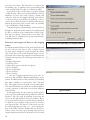
Rings that are damaged or lost may be registered
by choosing *** Ring destroyed *** from the species
list. You can also specify species code 99999 in the
new Euring species code in order to show this. By
using these possibilities the variables in the form will
be set appropriately. You must also specify a locality in
order to be able to store this registration. Remember to
reverse the variables when the next normal registration
of a ringed bird is made.
Registration of colour rings