1
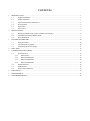
CONTENTS
1
2
3
4
5
6
7
8
INTRODUCTION ............................................................................................................................................. 1
1.1
Application Range ............................................................................................................................. 1
1.2
Unique Functions ............................................................................................................................... 1
1.3
Advanced Functions and Features ..................................................................................................... 1
1.4
Specifications ..................................................................................................................................... 2
1.5
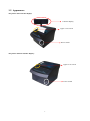
Appearance ........................................................................................................................................ 3
1.6
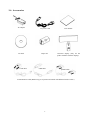
Accessories ........................................................................................................................................ 4
INSTALLATION ............................................................................................................................................... 5
2.1
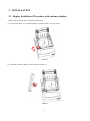
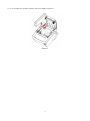
Display Installation (The printer with customer display) .................................................................. 5
2.2
Communication Board Replacement ................................................................................................. 7
2.3
Paper Installation ............................................................................................................................... 8
SETTING THE PRINTER .............................................................................................................................. 10
3.1
Using the Printer .............................................................................................................................. 10
3.2
Connecting the Computer ................................................................................................................ 10
3.3
Connecting the Power Supply...........................................................................................................11
SELF TEST ..................................................................................................................................................... 12
CONNECTING THE CABLES ...................................................................................................................... 12
5.1
Serial Interface ................................................................................................................................. 12
5.1.1
RS232 (D9) .............................................................................................................................. 12
5.1.2
RS232 (PHONE8C) ................................................................................................................. 13
5.1.3
RS232 (PHONE6C) ................................................................................................................. 14
5.1.4
RS232 (PHONE4C) ................................................................................................................. 15
5.2
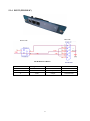
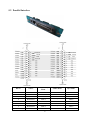
Parallel Interface .............................................................................................................................. 16
5.3
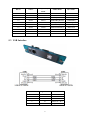
USB Interface .................................................................................................................................. 17
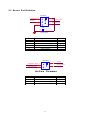
5.4
Drawer Port Definition .................................................................................................................... 18
DIP SWITCH................................................................................................................................................... 19
MAINTENANCE ............................................................................................................................................ 21
TROUBLESHOOTING .................................................................................................................................. 22