1
7 Press processes
Acknowledging by means of the reject box
Prerequisite
A function for the automatic acknowledgement of incorrect pressings is
included in the scope of delivery of the PLC program. However, this function
can only be used if a additional sensor is available. This sensor will detect
whether the part of an incorrect pressing has fallen into a rejects box (Not
OK box).
Connect the sensor for the automatic acknowledgement of an incorrect
®
pressing to the relevant input (see circuit diagram) of the SCHMIDT
SafetyModule.
Switching on the
rejects box
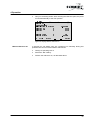
Select the "Data Input" system function key.
Select the "ACK n.ok-box on/off" parameter.
Enter the value "1". To switch the function off again, enter the value "0".
As soon as the function is switched on, the input is queried as to whether a
part of an incorrect pressing has fallen into a connected rejects box (n.okbox). This ensures that a "Not OK part" cannot continue the production
process. The message "Press error! ACK" is acknowledged automatically as
soon as the input transmits a signal.
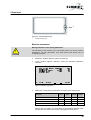
If the function "Acknowledging by means of the reject box" is used, the
incorrect pressing can no longer be acknowledged by pressing the "ACK"
softkey or the "Acknowledge incorrect pressing" key.
7.4
Counter
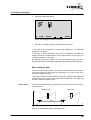
Piece counter
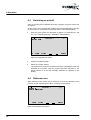
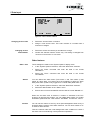
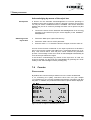
By default, this counter is always switched on in the control as-delivered.
If, for monitoring the quality, tolerances have been set (see chapter
"10.2 Tolerances"), the counter will distinguish between "OK parts" and "Not
OK parts". In addition, the produced total number of pieces will be displayed.
PC-DEAC
Quantity ok
Quantity nok
Quantity
:
:
:
Reached force
Reached stroke
:
:
2
PCTon
(1)
Dataset 1
Machine ok.
2-Hand-Release
Returnstroke at stroke:
PCToff
PCT-0-
30.000 mm
17 pcs
4 pcs
21 pcs
2138 N
40.432 mm
CNT-0-
ACK
Figure 7-6: View of "Output 1" with default piece counter
SCHMIDT® PressControl 3000 – V1.3
33