1
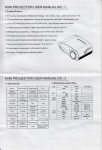
Chapter One Product Features:
Close the proJector press the power button
beside the indicator Ⅱ
ght at the top of the fuselage
more than 3 seconds, the
ghts go ou1 the
Ⅱ
prolector i$off
Irnage focus
According to the different distances beb″
een
prolector and screen or prOJection Wa", this
prolector can prolect diferent inch images A】 er
startup, put the product vertical opposite to the
prolecti° nˇ vaⅡ
focus,untⅡ
or screen,and then rotate the lens to
the image is clear
TF Card
TF Card lnse">select signal key)select to play
the】 丨
e
The operation signal>se丨 ect required mode of
oblect币 Ie
usB
!nse"U disk>to se丨 ectthe desired rnode)conΠ
select obled nle
HDⅢ
rm>
I
Conned the HDMl>signa!>seIect HDMl
AV
stad uρ and enter into this screen,then press
the seIed key,seIect relative mode,and then press
entei
~
ˉ_~ _ _~
Connect AV cable>signal>con】 rm>lnse"into the
co仃 esponding intel亻 aces according to color
Audio output∶
35mm
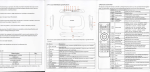
Chapter seven The Remote ControⅡ er
Button Functions:
Mute→ ∷∷∷
酊
{::::言
1MENU
阢w斟 2 zoom
喜
喜
膏
富
蜃
:E∶
i营
3 input
4`5PREV/NEXT
s/7REW/FF
8/9/10/11Direction key
12con】 rma刂 on
1 Press the menu bu廿 on to enter this screen,
and then press the left key to selectthe parameters
you need∶ the image mode,the choice oflanguage,
the sound pa廿 ern
2 Operate as what you need
13shadoWing
14Qu"
15/16 sound+仁
17 pause/play
18 dig"al keys
Chapter Eight Function operation:
sWⅡ ch on`o仟 machine
Prepara刂 on:when the prolectoris connected to
power supply through a power adapter, the red
ght at the top of the fuselage is
indicator Ⅱ
displayed,and the prolector enters into the standby
mode
start the prolector∶
press the power bu‖ on
press"INPUT1to selectthe signal sources
Product VVarranty:
○ne year warranty includes machine and
ghting;ProhibⅡ unauthorized disassembIy and
Ⅱ
beside the indicator Ⅱ
ght at the top of the fuselage
normal disassemble;othemise no longer enloy free
more than 3seconds,the indicator light being on,
warranty sen'ice
the prolector enters normal Working state