1
Serial Communication (SCOM) Interface
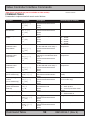
Manufacturer ID “MAN”
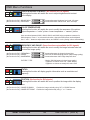
This command shall be sent to the unit to request Manufacturer ID Code. No data shall be sent with this command.
The unit will reply to this command with an ACK attention code. The DATA field
will be set to an ASCII string value that is unique for each manufacturer.
Examples:
Command Manufacturer ID Code:
0x07
0xFF
0x4D
0x41
0x4E
0x00
0x1D
0x4E
0x03
0x1B
Acknowledge Manufacturer ID Code “JHD”:
0x06
0xFF
0x4D
0x41
0x4A
0x48
0x44
0x29
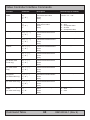
Unit ID Model/Version Number “VER”
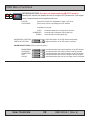
This command shall be sent to the unit in order to identify unit type by preassigned code and, establish the version of
the serial communications interface software. No data shall be sent with this command.
Any future revisions, such as additions or changes to the commands or data fields shall be coordinated with a
difference in the unit Version Number. The unit will reply to this command with an ACK attention code. The DATA field
has a unique 1-byte unit model code. The next 2 bytes shall contain major and minor version of the serial
communication protocol in use. Currently the unit model field is set to 0x01. The Version Number field for version 1 is
set to 0x01 0x00.
Examples:
Command Unit Model/Version Number:
0x07
0xFF
Unit Version 1.0:
0x06
0x05
0x56
0x45
0x52
0x00
0x0C
0x56
0x45
0x52
0x03
0x04
0x01
0x01
0x00
0xFD
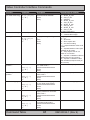
Potentiometer control “POT”
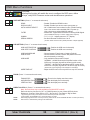
The unit may allow the backlight to be controlled by the local control (potentiometer) mounted on the front of the unit
by the remote control, or by the combination of the two. This command provides means to enable/disable the
potentiometer. LEN = one data byte.
0x00
Disables the potentiometer. Backlight controlled only by the remote control.
0xFF
Enables the potentiometer. Backlight is controlled by both the remote serial
interface and the potentiometer. (Default)
Note: In this setting, with the BRT command at 100%, the front potentiometer has
full control of the backlight. This is the initial setting when a unit is powered on.
If the data checksum is valid, the unit will reply to this command with an ACK attention code. The DATA field will
indicate the resulting control setting. If an invalid data checksum was received and the message was not broadcast
and RS485 (for units that support it), the unit will reply with a NAK attention code and the current control setting.
Communication Interface
IND100084-1
54
INB100034-1 (Rev 9)