1
Weighing Indicator DI-166SS Usage Manual
Step 4: Zero range / Zero tracking / Weigh Unit setup
‘Ut ABCD’ will display.
A : Zero range when power on, 1~9 mean 10%~90%FS to zero, 0 mean not to zero
B: Zero tracking range
Press
Press
to change basic unit and press ‘ADD PRINGT’ to change secondary unit.
to confirm.
Note:
1. In normal weighing mode, indicator will only be able to switch between ‘kg’ and ‘lb’ by pressing
if ‘Unit YX’ is set to ‘Unit 10’.
2. For the other digit combinations of ‘Unit YX’, indicator will only display the assigned unit as the basic
unit.
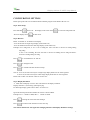
Step 5: Baud Rate
‘b XXXX’ will display on screen. The value shown is the baud rate.
Press
Press
to switch between baud rate of 1200, 2400, 4800 and 9600.
to confirm.
Step 6: Serial Printout Port Configuration
‘Ads XX’ will display on screen. XX values decide the print mode.
Press
to select digit position of X.
Press
to change the value of the selected digit.
Press
to confirm and return to normal weighing mode.
1.
XX=99: Indicator will not send out weight data unless when
or
is pressed in normal
weighing mode.
2. XX=01~98: Indicator will send out data after received command.
3. XX=00: Indicator will send out continuous date automatically reach to 10 times per second.
Step 7: Automatic Backlight
‘bAn X’ will display. Press
to change value of ‘X’.
10