1
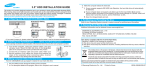
Shredder diagram
Paper feed opening
Installation and operation
CD/ DVD/ Credit card
shred here
REV/OFF/READY/FWD
Overheat
indicator
NOTE: This shredder includes safety interlocks. If the bin is not fully pushed into the
cabinet, the interlocks will not be activated and the unit will not operate.
1. Install casters/wheels (see image).
Take care to install the two locking wheels in the front.
2. Insert plug into the AC power socket.
3. Push the switch to the “READY” ( ) position.
4.When not in use, push the switch to off.
locking wheels
Preparation before use
Power cord
(AC 120V)
Non-locking
Wheels
How to use the shredder correctly:
1. Take care not to insert fingers, ties or other objects into the entry slot of the shredder.
2. Try to avoid laminated materials, plastic bags etc. from being passed through the
shredder. These materials can damage the cutters.
3. CDs/credit cards and smaller paper must be inserted to the right.
4. Do not shred more than the stated sheet capacity in one pass.
5.. The cutters will stop rotating automatically after finishing shredding when the switch
is in the “READY”( ) position.
6. Do not use the “REV”( )(reverse) function if it’s not necessary. Overuse of the
“REV”( ) function can result in shredded paper becoming jammed in the entry
slot, which will adversely affect the performance of the shredder.
Forward and reverse
Locking
Wheels
Hand grip
Pull-out
waste bin
3.
In case of jammed paper, please follow the procedure below:
1.Check if the bin is too full with paper - the bin should be emptied regularly to avoid
paper becoming jammed in the cutters.
2.Slide the switch to “REV” ( )to reverse the jammed paper.
3.If the paper is so jammed that it will not come out in reverse function, slowly push the
switch between “REV”( ) and “READY”( ) . Don’t do this too quickly as this
can damage the shredder.
4.WARNING – Do not under any circumstances use any metal objects (scissors, letter
openers etc.) in an attempt to clear the entry – this model has mains voltage inside
the casing, which could cause serious injury.
4.