1
SETTING UP VIRTUAL MACHINES
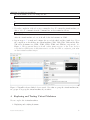
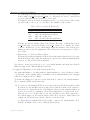
(a) Virtual Network Adaptor 1
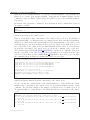
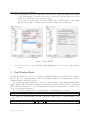
(b) Virtual Network Adaptor 2
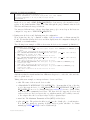
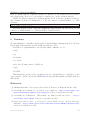
(c) Virtual Network Adaptor 3
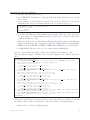
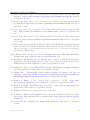
(d) Virtual Network Adaptor 4
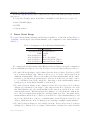
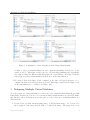
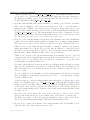
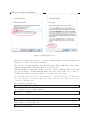
Figure 1: Configuration of network adaptors in the Linux virtual machine
is visible to selected virtual machines, but not to applications running on the host or to the
outside world [5]. This adaptor will be used for our networkprogramming and experiments.
Note that we name the Ethernet that this adapter is on as dVMen1. An adaptor with the
same setup of another virtual machines in the host is on the same Ethernet.
• We enabled Network Adaptor 4 and configured it the same as Network Adapter 3, i.e.,
configured it in the Internal Network mode as well. This adaptor and Network Adaptor 3 are
on the same Ethernet, i.e., dVMen1. See Figure 1(d)
3
Delopying Multiple Virtual Machines
To create a network of virtual machines, we will create a few virtual machines using the pre-built
Linux image discussed in Section 2. You can run as many virtual machines as your CPU, RAM,
and disk space allow. Following steps are the guide to create a network of 4 virtual machines on a
Windows host.
1. Download the pre-built virtual machine image, a Debian Linux image. See Section 2 for
the description of the image and the URL to download the image. The image is in a 7-zip
Revision:134:7b0b97d898ad
3