1
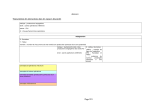
2. Setting/Logging Tool: Setting Manager
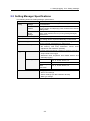
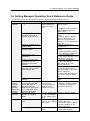
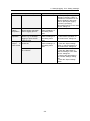
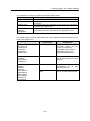
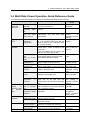
Function (What to do)
Device
status
acquisition
Check the status of each
device during connection
test or logging process
Device
operation
Operate a ZN series
device e.g. to start/stop
logging or eject the SD
memory card
Save device parameters in
a CSV file
Setting
output
in
CSV format
Save sensor parameters
in a CSV file
Operation (How to do)
Note 1: Specify the logging
targets by selecting "Valid" or
"Invalid" for each device in the
“Device Settings” device list.
Note 2: Specify the logging
interval by specifying
“Recording Interval” in the "Add
Device" dialog box.
Use the device list in See the "Status" column
“Device Settings” in
the setting menu
area
Use the device list in 1. Click the "Edit" button
“Device Settings” in
2. Use "Device operation" in
the setting menu
the “Edit Device” dialog box
area
Use the device list in 1. Click the "Edit" button
“Device Settings” in
2. Click the "Export setting"
the setting menu
button in “Device Settings” in
area
the “Edit Device” dialog box
1. Click the "Edit" button
2. Click the "Edit" button in
“Sensor Settings” in the “Edit
Device” dialog box
3. Change the parameters in
the “Sensor Settings” dialog
box
4. Click the "Export setting"
button
2-6