1
a
b
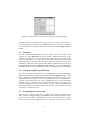
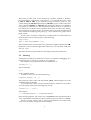
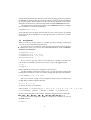
Figure 2: The products and order tabs with correct settings for the e3ga algebra.
1.2 Signature
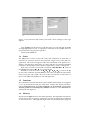
Switch to the signature tab. In the signature tab you can change the signature of the algebra. It is shown in figure 1b. Because the default setting is for
an euclidean signature, we don’t have to change anything here. Click on the
products tab.
1.3 Products
A geometric algebra generated by Gaigen does not contain every supported
product by default. Including a product generates more code, which will make
compilation slower and your executable larger. For our example algebra we
would like to have the geometric product, the outer product, the scalar product
and the left contraction (a type of inner product) in our algebra. The geometric
product is included by default. Click on the op tab and tick the checkbox labeled Outer Product. You will see that the tab name will be highlighted in red.
This means that the product is included in the algebra. Repeat the steps above
to also include the scalar (scp) and the left contraction (lcont) in the algebra.
The lower part of the products tab is used to add optimizations to the algebra. Optimized products execute much faster than unoptimized onces, but
they cause more code to be generated. We can’t possibly generate an optimized
version of every possible product for high dimensional algebras (as explained
in the user manual and the paper). That’s why we only want to optimize certain products which are used often.
Suppose we would like to optimize the geometric product of an even versor
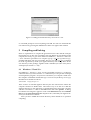
and a vector, and of an odd versor and an even versor. Click on the gp tab. Tick
the left 0 and 2 checkboxes (grade parts 0 and 2 are used in an even versor). Tick
the right 1 checkbox (grade part 1 is used in a vector). Click the add button.
The optimization should appear in the list below the checkboxes. Now tick the
left 1 and 3 checkboxes (grade parts 1 and 3 are used in an odd versor). Tick the
right 0 and 2 checkboxes. Click the add button. Another optimization should
appear in the list below the checkboxes. If you do not add the optimizations
correctly, your algebra will still work, but we can’t demonstrate some of the
profiling functionality later on.
2