1
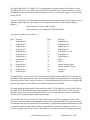
script name
rom
host
once
DOWNLOAD
ROM
HOST
ONCE
Output file
pci.s
pci.lod
pci.lod
Start Adress
P:INIT_PCI
P:START
P:START
Functionality
Program the EEPROM externally
Download via host computer
Load via OnCE emulator
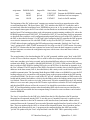
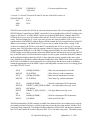
The beginning of the file "pciboot.asm" contains two routines located in an unused portion of the
vectored interrupt table. The first of these, INIT_PCI, initializes the DSP’s PCI controller, and is
executed only when the board boots from EEPROM on power-on. A few seconds after power on the
host computer interrogates the PCI bus to find out what boards are installed and configures this
inteface board. The booting procedure ends with program execution starting at address P:0, where the
EEPROM program inserts a JMP INIT_PCI instruction. INIT_PCI sets the phase lock loop parameter
as described above and does a self-configuration and personal software reset of the PCI controller in
the DSP, as described in Section 2.2 of PCI.pdf. After configuring the PCI controller the DSP program
overwrites the instruction at P:0 with JMP START to skip over the INIT_PCI routine, where the
START address begins configuring the DSP and processing commands. Similarly, the "host" and
"once" options place a JMP START instruction at P:0 to skip over the PCI_INIT routine. Executing
the INIT_PCI routine after the host computer has booted will cause the host computer to crash since
the host computer overwrites the configuration registers with its own values and doesn’t tolerate
foreign values.
The second routine is for downloading the file "pci.lod" generated with the script "host" to the DSP
via the PCI bus of the host computer. This is useful to allow development of interface board software
in the same machine as its being executed, and to download different software versions than are
resident in the ROM. The routine is labeled DOWNLOAD_PCI_DSP_CODE and uses DSP software
that is resident in DSP ROM for loading DSP code over the PCI bus, as described in Appendix A of
the User’s Manual. The PCI interface of the DSP is first placed in a mode where it does not insert PCI
addresses in the data stream (IAE=0, described below) and a sanity word is read from the PCI bus to
establish communication. The Operating Mode Register OMR is then set to $00000C to cause the PCI
loading software to be executed once the program jumps to the program resident in the DSP starting
at location $FF0000. The first two words of the file "pci.lod" contain the number of DSP words to be
loaded and the starting load address, which is also the address where the loading routine jumps to after
it is finished. These two words are set in the "pciboot.asm" file in the assembler directives; the starting
address is set to zero and a jump to the INIT routine is placed there so that the PCI self-configuration
and download DSP software will not be executed. Care should be exercised not to modify the
INIT_PCI and downloading routines when downloading DSP code because an error introduced in
either of them will necessitate the host computer being re-booted so correct software can be loaded
from the EEPROM.
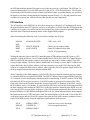
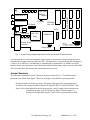
The "once" script allows for the DSP to be loaded from the On Chip Emulator (OnCE) port that
Motorola has incorporated into the DSP. To use this port a Command Converter is connected via a
small ribbon connector to the OnCE connector on the interface board, and another ribbon cable is
connected between the Command Converter and a Motorola-supplied interface board in a Sun, PC or
Mac. These are marketed in the ADS, or Advanced Development System, line of products, and are
described in the Motorola Web site. A program on the computer hosting the ADS can read the
"pci.lod" file produced by the "host" script and load it into the DSP. This is particularly useful if
PCI Interface Board, pg. #3
Updated Dec. 2, 1999