1
Freescale Semiconductor, Inc.
14EBDI User’s Manual
1
INTRODUCTION
Freescale Semiconductor, Inc...
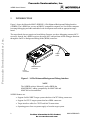
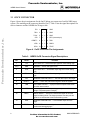
Figure 1 shows the Motorola MMC14EBDI02 14-Pin Enhanced Background Debug Interface
(14EBDI). The 14EBDI lets you use an IBM PC-compatible computer or a Sun Solaris computer
to manage debugging and other embedded code development tasks with an appropriate target
board.
The target board does not require on-board debug firmware, nor does debugging consume MCU
resources. Instead, the 14EBDI exercises the target MCU and performs all the debugger functions
through the OnCE or Background Debug Mode (BDM) connector.
Target
Cable
DB9 Serial Port
Connector
Power
Connector
Figure 1. 14-Pin Enhanced Background Debug Interface
NOTE
The 14EBDI replaces Motorola’s earlier EBDI (the
MMCEBDI01), adding compatibility for MMC2080 and
MMC3401 microcontrollers.
14EBDI features are:
• Support for M•CORE™ target systems that have OnCE™ debug connectors.
• Support for CPU32 target systems that have BDM connectors.
• Target interface cables for CPU32 and OnCE connections.
• Operating power from a separate supply or from the target system.
2
For More Information On This Product,
Go to: www.freescale.com
MMC14EBDIUM/D