1
When you have finished entering the transaction, click ‘Record’. Recording the payment of
the transaction will normally occur on the same day, using the same date. You will not
need to worry about categories when recording the payment, as this information has
already been selected when the sale was first entered. Be sure, however, to select the
correct bank account to deposit the money into when entering the payment – this is
particularly relevant if you operate a number of different accounts.
From now on, when any expenses are entered that are specifically for that grant, you will
be able to select the relevant category in the same manner as shown for this transaction.
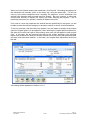
To be truly accurate, and this really only applies if you are aware of exactly what projects
(jobs) the original grant is to be applied to, when entering the original Sale transaction for
the grant, the monies can split to show exactly how much will be applied to each project
(job). In this case, the two amounts can then be job costed, allowing a very accurate
report to be produced for each job, showing exactly how much money has been allocated,
and how much has been retained. In this case, your original Sale transaction would look
like this:
Job costing will be explained in Section 2.6.1.4.
MYOB Training Manual
April 2006
2-138
Part 2:
Processing Transactions in MYOB