1
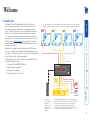
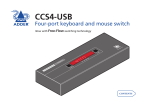
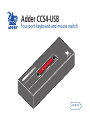
Welcome The video displays are connected directly to their respective systems as usual. A single USB link (plus an optional speaker connection) is made between each system and the CCS4 unit. PC2 PC3 PC4 configur PC1 CCS4 unit COMPUTER K/M SPK USB1 USB2 MODE 4 USB 1 www.adder.com 3 2 1 The optional remote control allows the CCS4 unit to be neatly concealed amongst the cabling. USB 2 The keyboard/mouse, the speakers and two individual USB channels can be collectively or separately switched through to each PC system. These are electronically switched to the required system using any of four methods: CCS4 unit control panel, keyboard key-presses, mouse buttons or optional remote control. The Adder CCS4-USB (Command and Control Switch, four port, USB) is a compact unit created to allow a single operator to access information and control operations across numerous systems and screens. With the CCS4 unit, you can use a single USB keyboard and USB mouse to fulfil functions that previously required four separate sets. This provides immediate savings in both desk space and also the time required to access and control up to four systems and screens. The CCS4 features our True Emulation technology, which ensures that the full characteristics of the connected USB keyboard and mouse are passed to every system. In addition to switching the keyboard and mouse, the CCS4 can also share a set of speakers and two separate USB peripherals between the four systems. This can be done either in concert with the keyboard and mouse (and each other) or totally independently. Switching between the systems connected to the Adder CCS4 can be achieved in four different ways: • The Adder CCS4 unit COMPUTER button • Keyboard hotkey combinations • Mouse button combinations • The optional remote control selector welcome Introduction