1
P X 2 0 0
U S E R
G U I D E
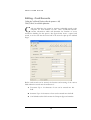
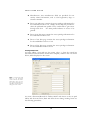
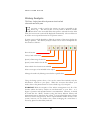
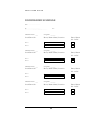
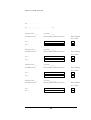
The function & explanation of each of the control fields in the door record are
listed below:1. Door Name:
A 32 character door or location name can be
keyed in here, to enable easy identification of each door during the
creation of Card Records and listings etc.
2. Lock Release Time:
The Release Time, or strike delay, is set in
seconds and can be anything between 1 & 255. If the Lock Time is
set to 0 then the system assumes that the strike delay will be 1
second.
3. Enrolment reader:
This check box indicates that this reader is
used for enrolment purposes using the card add procedure.
4. Alarm Delay Time: As with the Lock Time, the Alarm Delay Time
is also in seconds and can be set for anything up to 255. However,
if the Alarm Delay is set to 0, then alarms are disabled for that
door. A door left open for longer than the Alarm Delay Time will
cause a Door Left Ajar warning. Similarly, a door opened without
a valid card entry (or exit request) will cause a Door Forced Alarm.
For further information on what to do when an alarm occurs see
Alarm Acknowledgment.
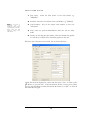
5. Free Profile:
A Time Profile set here will cause the door to
allow free access by permanently releasing the strike for the
duration of the active period. At all other times the door will be
accessible to valid card holders only. The example shows that a
Time Profile ‘Mon-Fri 09:00 to 17:00’ has been selected. When no
Profile is selected, the system will not set the lock to Free Access at
any time. For further information see Editing - Time Profiles.
6. Bolt Profile:
A Time Profile set here will cause the door to
become permanently locked or "Bolted" whenever the selected
Time Profile becomes Active. Bolted mode is so called because it
has the same effect as a mechanical bolt applied to the door, e.g. no
cards will be accepted at that door during the active period. In the
example above no Bolt Profile is set. When no Profile is selected,
the system will not Bolt the door at any time. For further
information see Editing - Time Profiles.
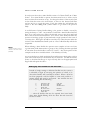
7. Lock Mode:
The operation of the lock output in the control panel,
can be changed between ‘Safe’ (Fail Open) and ‘Secure’ (Fail
Closed). In the sample record above, the door is fitted with a Fail
Safe locking device (such as a mag-lock) and has been set to ‘Fail
Open’. Consult your Supplier for more information on the types
of lock that have been fitted.
19