1
come with your Drumdrops Single Hits Pack download.
3.1.5.7 Studio One Impact Soundsets
Double click on the soundset file to install the soundset into Studio One.
Select the preset that you want to load from the soundset list window in
Studio One. Drag the preset into the main window of Studio One to load
the preset.
3.1.5.8 Ableton Drum Rack
Double-click on the .alp file to install the Live Pack into Ableton. Select
the location or create a new folder that you want to install the files to.
If the folder is not showing in the Ableton window, click on Add folder
in the Places menu in the Ableton window and navigate to your chosen
folder. Once installed, double-click or drag your preferred Drum Rack
preset into the Ableton window to load the sampler.
Note: Do not install the files into the Ableton Factory Packs folder as the
files will not show up in Ableton and you will not be able to use them.
3.1.5.9 Reason Refills
Double click on the Refill file. That will open Reason for you if it’s not
already open. Select whichever patch you would like to load from the
patches folder supplied within the Refill from the pop-up window and
select open.
3.1.5.10 Renoise Sampler
(Patch made by Jon Halford - https://soundcloud.com/theftofcarbon/)
Double Click on the Renoise .xrni file supplied with your download. Your
renoise application will open if it’s not already and the kit will be loaded
into the sampler.
3.1.5.11 TX16Wx
(Patch made by Suleiman Ali - burzukh.bandcamp.com)
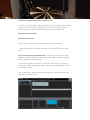
Load the TX16 sampler onto an instrument track in your DAW. Drag in
one of the patch files into the main TX16 window and the patch will
load. There are patches for the whole kit as well as individual drums.
21