1
RC4 USER MANUAL – TABLE OF CONTENTS
Disclaimers ................................................................................................................................................................................. 2
Not For Use Where Human Safety May Be At Risk ............................................................................................................... 2
Not For Control of Pyrotechnical Devices .............................................................................................................................. 2
No 3rd-Party Safety Certification ............................................................................................................................................. 2
RC4 2.0 System Overview ......................................................................................................................................................... 4
Getting Started – Setting Up RC4 Components ...................................................................................................................... 5
Items You Do NOT Need to Get Started ................................................................................................................................. 5
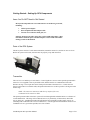
Parts of the RC4 System.......................................................................................................................................................... 5
Transmitter .............................................................................................................................................................................. 5
Receivers ................................................................................................................................................................................. 6
TXD-Series Transmitter Operation ......................................................................................................................................... 7
The TXD-Series User Interface – Overview ........................................................................................................................... 7
TXD-Series Keypad Map ........................................................................................................................................................ 8
The Main Screen – Watch Channels ....................................................................................................................................... 8
Set DMX Start – Block of Contiguous Channels .................................................................................................................... 9
Edit Individual DMX and CV Channel Assignments ............................................................................................................ 10
Save DMX Setup .................................................................................................................................................................. 11
Recall DMX Setup ................................................................................................................................................................ 11
Transmitter Channel Test Functions...................................................................................................................................... 12
RX4 Dimmer Settings (Done at Transmitter) ........................................................................................................................ 14
Select Receiver RX Number / Display Receiver Status (Battery Voltage) ............................................................................ 14
Set RX Channel Assignments ............................................................................................................................................... 15
Set Other RX Parameters ...................................................................................................................................................... 16
RX Setup Copy / RX Setup Paste.......................................................................................................................................... 17
Send RX Config .................................................................................................................................................................... 18
RX4 Receiver Operation ......................................................................................................................................................... 19
RX4 Receiver Buttons and Indicators ................................................................................................................................... 19
Changing the RX Number ..................................................................................................................................................... 20
Default Settings ..................................................................................................................................................................... 21
Dimmer Power Wiring and Fusing........................................................................................................................................ 22
RX4 Receiver Power Connection Diagram ........................................................................................................................... 23
RX4-HO High Output Receivers........................................................................................................................................... 25
RX4-MINI Receivers ............................................................................................................................................................ 27
RX4-STANDARD Typical Wiring Diagram ........................................................................................................................ 29
RX4-STANDARD / RX4-HO Typical High-Power Wiring Diagram .................................................................................. 30
Receiver Load Testing – Receiver Test Buttons ................................................................................................................... 31
Receiver Battery Voltage Indication ..................................................................................................................................... 31
Radio Settings .......................................................................................................................................................................... 32
Set System ID ....................................................................................................................................................................... 32
Set System Baud Rate ........................................................................................................................................................... 33
Additional System Parameters .............................................................................................................................................. 33
Setting the System ID............................................................................................................................................................ 33
Using Other Channels ........................................................................................................................................................... 34
Complete LAWNII Configurations for the RC4 System ....................................................................................................... 34
RX4-MINI Lawn-II RF Module Setup .................................................................................................................................. 35
A General Discussion of Radio Reliability ............................................................................................................................. 36
Troubleshooting ....................................................................................................................................................................... 37
Simple Solutions to Common Problems ................................................................................................................................ 37
Reset and Initialize to Factory Defaults ................................................................................................................................ 39
RC4 Specifications ................................................................................................................................................................... 40
Soundsculpture RC4 Operation Manual
Page 3 of 41