1
3.3. TESTBED IN DETAIL
3.3 Testbed in Detail
This section presents a detailed description of the testbed and its functionality. The
testbed is structured according to the different components of experimentation as described in section 2.3 on page 13. This structure resembles the different stages of the
process of experimentation. It also reflects the conceptual and data objects of different
types9 and purposes that are involved by the process and are thus contained in the
testbed such as problem types, problem instances, algorithms, configurations, experiments, jobs, and data and analysis scripts.
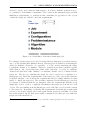
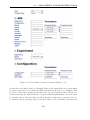
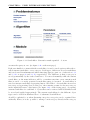
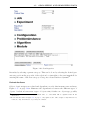
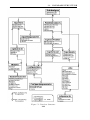
The main menu of the testbed (see figure 3.1 on page 78), always located on the left
side of the testbed web pages, also reflects this structure. Each submenu represents
one step and aspect of experimentation in terms of grouping similar data together in a
submenu. For example, the submenu representing algorithms, ’Algorithms’, displays the
algorithms or rather algorithm specifications contained in the testbed to the user and
provides means to manipulate these. Submenus manage groups of similar data. The
single (data) objects a submenu presents are called entries10 . That way, they provide
a coarse overview over the objects contained in the testbed they represent and provide
some general functionality such as editing, deleting, and creating new objects. Beside
this common functionality, each submenu has special operations that can be performed
on the entries.
In this section, the common functionality of submenus is described first together with
common operations that can be realized with the entries of each submenu. Some general information explaining details about object dependencies will be given also. In the
second part of this first subsection, the handling and navigation within submenus is
explained. Next, a detailed description of each submenu is given in the following subsections with one subsection per submenu. The section concludes with a discussion of how
to check the testbed’s status and of how to organize and handle different types of hardware within the testbed when run in a network. Finally, the the command line interface
of the testbed that provides important functionality that can not be implemented via a
web front end is presented and treated in detail.
3.3.1 User Input
Before plunging into the details, some basic information with respect to how the user
can enter information in web pages is given. The user can enter information on web
pages in different ways. Any user input is requested via various types of input fields.
9
The notions of data type, object type, kind of object, type of object, type of data are used interchangeably throughout this text. Compare with begin of section 2.4 on page 40 and subsection 2.1.2 on
page 7
10
The notions entry and object are used interchangeably through this document, essentially meaning
the same
95