1
How to Use the VCA Matrix: Examples
Basic usage: Simple 4x4 Mixer
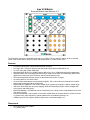
Simply by running up to four inputs into the Signal Inputs and running the four outputs to different destinations,
you can use the Level pots and Mute buttons to route the inputs in any amount/combination to the outputs.
Although seemingly trivial, this is often a good way to start using the VCA Matrix while creating a patch. As your
patch evolves, you will start plugging into the Control jacks, mult'ing/stacking inputs and outputs, creating
feedback loops, and generally using the VCA Matrix to weave your signals into a patch.
Basic usage: Keeping your modulations related to each other
Let's say you're making a patch and you want to modulate four different parameters using four different
modulation sources. You want all the modulations to be related to each other but not identical. Simply by using
the VCA Matrix as a 4-in, 4-output mixer, you can quickly have synchronicity between your four modulation
destinations.
Now take it a step farther by running other modulations (e.g. touch pads, LFOs, etc) into the Control jacks to
control each modulation mix amount. For instance, run the four pressure outputs of of a Pressure Points into four
Control jacks and you have a touch surface mixer. Or use the PP to trigger four envelopes... etc.
Feedback Mixer
Taking the last example one step further, you can take one of the outputs (mult'ing or stacked if necessary) and
plug that back to one or more of the Control inputs on the VCA Matrix. Continue routing outputs back into Control
inputs, perhaps running them through other modules first. Feedback loops can quickly spiral exponentially into
chaos or flat-lined CV, so using the Mute buttons and carefully setting the Level pots is essential.
Amplitude Modulation (AM)
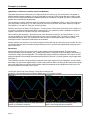
Since the VCA Matrix operates in the full audio range for both the Control and Signal inputs, you can easily
achieve Amplitude Modulation (“cross modulation”) effects by running an audio frequency into the Signal input
and another audio signal into a Control input. For example, run VCO #1 into Input A. Now run a VCO #2 into
Control input A-1. On output 1 you'll hear a rich sound based on both input frequencies. Adjust the VCOs and
play with the A-1 Level pot to hear the range of textures possible.
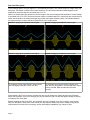
Tip: Run the Control VCO #2 through an unused channel on the VCA Matrix (e.g. Input B), and run an envelope
with a sharp attack into the associated control jack (e.g. Control input B-2). Patch the output (e.g. Output 2) into
the original Control Input (e.g. A-1). Now the AM effect will be modulated in a percussive way.... and.... you can
play with various associations such as bringing some of the Control VCO into Output 1 (using B-1). Keep
extending this patch in the same way to have another VCO#3 modulate VCO#2, with a different envelope... etc.
Voltage Controlled Signal router (Quadrature)
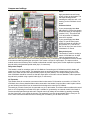
In quadrature panning, one or more input signals is routed to four outputs (which could be four speakers),
usually using 4 LFO CVs that are each 90 degrees out of phase.
For example, the MATHS can be used to generate quasi-quadrature LFOs, by following the “Whirly Bird”
example in the MATHS manual. Alternatively, the Malekko/Wiard Oscillator has a variable phase output, so it can
be used to generate two 90-degree out-of-phase triangle waves. From either module, mult/stack both triangle
signals and invert them, and then run the inversions into A-3 and A-4. Run the original non-inverted triangle
waves into A-1 and A-2. With the Level pots on Row A turned up, you should see the lights swell in a quadrature
fashion. You may wish to level-shift the Oscillator's outputs using the Malekko 8NU8R's “red” mode, a MATHS,
the Bubblesound LvL+RM or any number of other level shifter modules.
Page 2