1
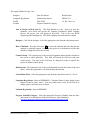
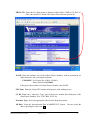
Description: For all projects (other than bridge), enter the description of the type of
work being performed on this project. For Bridge projects, enter the description
from the front sheet title block.
Location: For L&D projects, use the first line for FROM: (location) and the second line
for TO: (location). For Bridge projects, enter the location from the front sheet title
block.
Unit System: Defaults to E (English Project). Enter M for a Metric Project.
Federal Project No.: Enter the federal project number, if applicable, in its entirety,
complete with dashes, parentheses, etc. If the project is not federally-funded, enter
NONE.
EXAMPLE: NH-5401(876)
Route Number: Enter the route number exactly as it appears in the State Project
Number (4 digits):
Ex. #1: Project number is 0064-122-101, C501. Route number is 0064.
Ex. #2: Project number is U000-124-110, B610. Route number is U000.
Ex. #3: Project number is 6007-058-102, C502. Route number is 6007.
Road Section No.: Enter the section number of the project number (the third part of the
State Project Number).
Ex.: Project number is 0064-122-101, C501. Section number is 101.
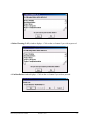
Co./City: Select the appropriate code from the drop-down menu. The reference table
consists of all county and city codes.
Federal Oversight: Select the appropriate code from the drop-down menu. Select NFO
for a federal project with no federal oversight, FO for a federal project with federal
oversight and N/A for a state project.
Beginning Station: Enter the station from STATION BEGIN PROJECT including the
“+” and the “.”. (Ex.: 1290+10.72)
Ending Station: Enter the value from STATION END PROJECT including the “+” and
the “.”. (Ex.: 1360+15.95.)
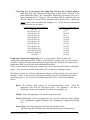
Item Code Table: Select from the drop-down menu. Select 07 for English projects;
select 08 for Metric projects.
Status: Status of the project. Select the appropriate code from the drop-down menu.
VDOT Trns·port PES User’s Manual
December 1, 2011
3-3