1
PACKAGE CONTENTS
» Scanner unit
» User’s manual
» A/C power adapter (12V, 4.16A, DC)
» Amber filter board (included)
» Black plastic board (included)
» Gel tray w/o stopper (included)
Upper lid
Power Button
LCD display
Up/Down, Left/Right menu button
USB 2.0 Port
SCANNER COMPONENTS
Cyan Light/White Light selection switch
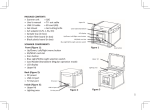
Front (Figure 1):
» Up/Down, Left/Right menu button
» USB 2.0 Port
» Scan button
» Cyan Light/White Light selection switch
» Power On/Off Button
» LCD display
» Upper lid
Scan button
Upper lid
Lighting area
Back (Figure 2):
» DC power
» USB 2.0 port
» VGA port
Inside (Figure 3):
» Upper lid
» Lighting area
» Lid Sensor
Figure 1
Lid Sensor
DC power
USB 2.0 port
VGA Our Port
Figure 2
Figure 3
2