1
preTee
1.2 ABES preTee Task
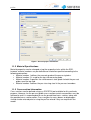
The ABES preTee task is structured into a number of input tabs. All input options are
pre-defined with defaults. The tabs can be filled out in any order. Interaction of input
data between different tabs is controlled automatically.
When all input parameters have been defined by the user or the pre-defined values
are sufficient the user selects <OK> to proceed. By pressing the <OK> button a
CADINP file is generated in the background, this file may be viewed using the
TEDDY option within the SSD. Users with knowledge of the CADINP language can
modify this file using the TEDDY option. However, it must be stressed that this file
is over-written every time preTee is terminated using <OK>.
If the ‘Calculate immediately’ option is ticked, when the <OK> is selected the
CADINP file is generated by preTee and executed immediately. Depending on the
size of the defined girder bridge deck this may take a few moments.
Automatically generated output is available immediately after calculation in the report
file that can be viewed using the URSULA report viewer. This automatically
generated report can be supplemented freely by using the WinGRAF and DBView
post-processors.
version 2.0
6