1
Quick Guide for DAQ Manager software
1. GENERAL CHARACTERISTICS
DAQ Manager software allows you to download data recorded by the MultiCon devices
(e.g. temperature, humidity, pressure) and visualize them as tables and graphs. Data transfer
is performed using a portable USB Flash Drive or via an Ethernet network.
2. FIRST LAUNCH OF THE APPLICATION
After completing the installation process, start the application from the system Start Menu
in the folder “DAQ Manager”. From this folder you can safely uninstall the program and the
measurement data archived up to the time of uninstalling will remain on your hard disk for later
use.
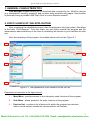
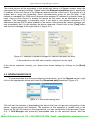
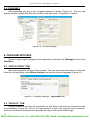
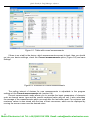
After first launching of the program, the window shown will look like Figure 2.1.
1
5
2
3
6
4
Figure 2.1. The appearance of the interface on the first run
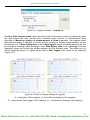
Explanation of elements in the figure above:
1 - Main Menu - provides access to less frequently used functions of the program;
2 - Side Menu - allows access to the main functions of the program;
3 - Devices List - contains a list of devices for which the program has archived
data or virtual devices created for communication via Ethernet;
3
Metrix Electronics Ltd Tel: +44 (0)845 034 3234 Email: sales@metrix-electronics.com