1
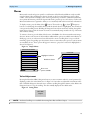
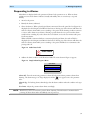
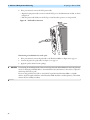
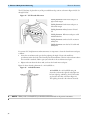
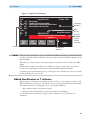
Installing the Data Card 3: Setting Up Installing the Data Card To install the data card: 1 Insert the data card in the data card tray, sliding it under the tray clip. Confirm that the connector is facing away from the pull tab. 2 With the front of the tray facing forward, press the data card and tray firmly into the data card slot located on the right side of the HeartStart MRx and marked by the data card symbol. Figure 34 Installing the Data Card/Tray Sele Energcyt 0 0 r 1 Charge On nitor 2 Off On AED Shock 3 CAUTION: Even if a data card is not used, the data card tray should always be installed to protect the device from the ingress of liquids or solids. Carry Cases The HeartStart MRx carry cases and accessory pouches are designed to hold your essential monitoring and defibrillation supplies and accessories. Both hard and soft cases include side carry bags and a back pouch. Installing the Hard Case To install the hard case: 1 Disconnect all external power and remove all batteries. 2 Lower the device into the sleeve of the carry case. The rear base of the device fits in the sleeve socket. Paddle Tray a. If paddles are connected, disconnect them from the Therapy port and remove them from the paddle tray. b. Remove the 4 T-15 screws from the tray plates. c. Gently lift the paddle tray up, leaving all wires connected. 47