1
Content
1
Introduction .............................................................................................................. 5
2
Document overview ................................................................................................. 7
3
Technical Data .......................................................................................................... 8
3.1
3.2
3.3
3.4
3.5
3.6
3.7
3.8
3.9
3.10
3.11
3.12
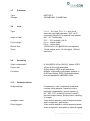
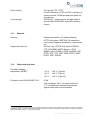
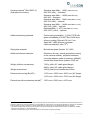
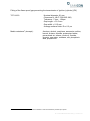
Parameters of the explosion protection ............................................................... 8
Electrical parameters of the camera .................................................................... 9
Electrical parameters of the heating (optional) .................................................... 9
System cable SKDxx ......................................................................................... 10
Supply cable (optional) ...................................................................................... 10
Sensor ............................................................................................................... 11
Processor .......................................................................................................... 12
Lense ................................................................................................................ 12
Streaming .......................................................................................................... 12
Parameterization ............................................................................................... 12
Network ............................................................................................................. 13
Other technical data .......................................................................................... 13
4
Safety guidelines .................................................................................................... 16
5
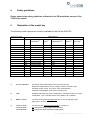
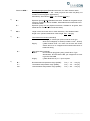
Illustration of the model key .................................................................................. 16
6
Commissioning ...................................................................................................... 18
6.1
6.2
Step 1: Installation ............................................................................................. 18
Step 2: Electrical connection ............................................................................. 18
6.2.1
6.2.2
6.2.3
6.3
6.4
Testing of the status LED .................................................................................. 25
Step 3: Adjusting the lens .................................................................................. 25
6.4.1
6.4.2
6.4.3
6.4.4
6.4.5
7
Potential equalization ............................................................................................................... 19
Connection and protection ....................................................................................................... 20
Tests prior to switching on voltage .......................................................................................... 24
Work preparation ..................................................................................................................... 27
Opening the pressure-resistant housing .................................................................................. 27
Removing / inserting an SD storage card ................................................................................ 30
Hardware Reset ....................................................................................................................... 31
Closing of the pressure-resistant housing ............................................................................... 33
Network access and visualization ........................................................................ 35
7.1
7.2
7.3
Browser Support................................................................................................ 35
Assigning the IP address ................................................................................... 36
Password / Identification ................................................................................... 37
8
Maintenance / Servicing / Alterations ................................................................... 38
9
Repairs and Maintenance ...................................................................................... 38
10
Disposal / Recycling ........................................................................................... 38
11
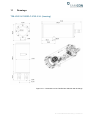
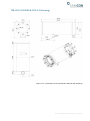
Drawings.............................................................................................................. 39
12
Notes .................................................................................................................... 42
Doc.-ID: 141023-PT08BA-TG-ExCam IPQ1755 series_en_rev.01, Seite 2 von 44