1
ASUSTOR NAS Quick Installation Guide
Table of Contents
Notices.................................................................................................................... 3
Safety Precautions ..................................................................................................... 4
1.
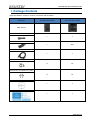
Package Contents ............................................................................................... 5
2.
Optional Accessories ......................................................................................... 6
3.
Hardware Installation Guide ................................................................................... 7
3.1.
Hard Disk Installation ...................................................................................... 7
3.2.
Connecting and Powering on the NAS ................................................................. 9
Software Installation Guide .................................................................................. 10
4.
4.1.
CD Installation ............................................................................................ 10
4.1.1.
Windows Users ....................................................................................... 10
4.1.2.
Mac Users ............................................................................................. 11
4.2.
Web Installation........................................................................................... 12
4.3.
Installation Using a Direct Connection ................................................................ 12
Appendix ........................................................................................................ 13
5.
5.1.
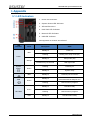
LED Indicators ............................................................................................ 13
5.2.
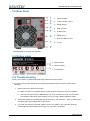
Rear Panel ................................................................................................ 14
5.3.
Rating Label ............................................................................................... 14
5.4.
Troubleshooting .......................................................................................... 14
Page 2 of 17