1
Amarra Symphony with iRC v2.6 User Manual Table of Contents
About This Manual
Notice of Liability
Notice of Rights
1.0 Welcome to the World of Amarra Symphony with iRC
2.0 Getting Started
2.1 Connecting to your output device
2.2 Launching Amarra Symphony the First Time
2.3 Launching Symphony Next Time 3.0 The Amarra Symphony Horizontal User Interface
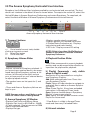
1) Transport buttons 2) Symphony Volume Slider
3) Amarra Symphony UI Window
4) Playback Position Slider
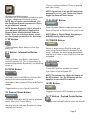
5) Playlist Commands - only visible when in Playlist mode* 6) Artwork window
7) ‘M’ Button
8) ‘I’ Button - Information Button
9) CACHE Button
10) Amarra/iTunes Button
11) PLAYLIST Button
12) TRACKS Button
13) EQ Button
14) iRC Button
15) ‘P’ Button - Preload Tracks Button
16) LINK Button
17) Up/Down Arrow Button
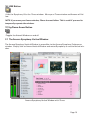
3.1 The Amarra Symphony Vertical Window
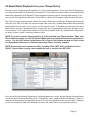
4.0 Basic Music Playback from your iTunes library 5.0 Additional Features to Further Improve your Sound
5.1 Amarra Playlists
5.1.1 General Information about Amarra Playlists
5.1.2 Amarra Playlist Window
5.1.3 Entering Playlist Mode 5.1.4 Loading tracks into a Playlist
5.1.5 Using your Amarra Playlist
5.1.6 Saving a Playlist for Future Recall
5.1.7 Opening an Existing Playlist
5.1.8 Clearing your Playlist
5.2 CACHE Mode
5.3 Amarra EQ
5.3.1 Displaying the EQ Window
5.3.2 Turning the EQ On
5.3.3 Adjusting EQ
5.3.4 Setting Amarra EQ via iTunes
5.3.5 Saving and Recalling EQ Settings
6.0 Playing FLAC Files
6.1 Playing FLAC Files Natively via Amarra Playlists
4
4
4
5
6
6
6
7
8
8
8
8
8
8
8
9
9
9
9
9
9
9
9
9
10
10
10
11
14
14
14
15
15
15
16
17
17
17
17
18
18
18
18
19
19
20
20