1
Record a Video
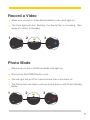
Make sure you are in Video Mode (default mode, blue light on).
The blue light will start flashing, the SunnyCam is recording. (See
page 6 to return to standby)
1
3
Video
Audio
Photo
Reset
Video
Audio
Photo
Reset
Mic
Micro SD
Micro SD
2
Power/Record
Power/Record
USB
USB
Power/Record
Micro SD
Micro SD
Mic
Mic
Photo Mode
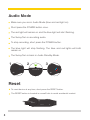
Make sure you are in still Photo Mode (red light on)
Short press the POWER button once.
The red light will go off for a second and then come back on.
The SunnyCam has taken a picture and is back in still Photo Standby
Mode.
1
2
Reset
Video
Audio
Photo
Reset
Mic
USB
3
Video
Audio
Photo
Power/Record
USB
Micro SD
Power/Record
Power/Record
Micro SD
Mic
Mic
7