1
Come into use driving recorder
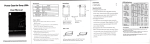
1. Power on: press power button once and blue indicator light will turn on.
2. Power off: press power button once again and blue indicator light will turn off.
Notice: when battery runs low, driving recorder will power off automatically after indicating low
battery.
Battery charging
There are three ways to charge battery; red indicator light is bright during charging. It takes an
hour to charge and red charging indicator will power off automatically after finishing charging.
1. Use power DCSV outlet to charge
2. Use USB to charge
3. Use auto power to charge
Place storage card
Propel Micro SD storage card to card trough straightly according to direction of body until you
hear the sound of “click”.
Remove card
Push Micro SD card forward and then card will be removed after popup.
Notice: this machine requires to use high-speed Micro SD card and above CLASS 4.
Basic operation of driving recorder
I.
How to switch camera shooting/ photograph/system setting
Press right key to change to camera shooting/ photograph/ system setting
II. How to shoot and set shooting option
A. Shooting
Open the camera and picture recording will automatically start; press OK key to stop picture
recording and press again to restart picture recording.
B. Set shooting option
Under the condition of video recording mode, press left key to enter the option of “menu setting”;
the column is yellow at that time.