1
Application Note: Recommendations for setting up TOFD on the veo.
3. Set up the Part details (using the part view or overall
view is helpful)
Ensure that the Thickness is correct. For TOFD the
exact weld geometry is not so important, as we are
not using reflections, but it should be approximately
correct as a visual guide.
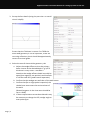
4. Select the overall view and the geometry tab
a. Adjust the wedge Offsets so that the primary
beam insects at the desired depth. E.g. 2/3 of
thickness in many cases – see table 1.
Note that the wedge offsets should normally be
equal (one negative, one positive) and that each
is half the total PCS (probe centre separation)
b. Confirm that the wedges are well clear of the weld crown.
c. Confirm that (for a single probe inspection) the
shaded scan area covers the entire volume of
the weld
(Beam divergence in the view menu should be
set to -12dB)
d. If these requirements cannot be achieved it may
be necessary to change the PCS, wedge angle or
even probe type.
Page | 3