1
PHOTOMOD 5.24
Creating project
Table of Contents
1. General Remarks ..................................................................................................................... 3
2. Workflow .................................................................................................................................. 3
3. Creating and selecting active profile ........................................................................................... 3
4. Creating project ........................................................................................................................ 5
4.1. Placing project files in resources system ......................................................................... 5
4.2. Creating new project ...................................................................................................... 7
4.3. Project types ................................................................................................................. 9
4.4. Coordinate systems ..................................................................................................... 27
5. Adding images in a project ...................................................................................................... 35
5.1. Block editor ................................................................................................................. 36
5.2. Block menu ................................................................................................................. 39
5.3. Work with images block in 2D-window ........................................................................... 41
5.4. Adding strips ............................................................................................................... 45
5.5. Adding images ............................................................................................................. 45
5.6. Images correction and adjustment ................................................................................ 67
5.7. Editing images block .................................................................................................... 77
6. Managing projects .................................................................................................................. 81
6.1. Project menu ............................................................................................................... 81
6.2. Project management window ........................................................................................ 82
6.3. Opening project ........................................................................................................... 84
6.4. Viewing project properties ............................................................................................ 85
6.5. Viewing project report .................................................................................................. 86
6.6. Importing projects from PHOTOMOD 4.x ....................................................................... 87
6.7. Copying project ............................................................................................................ 91
6.8. Deleting project ............................................................................................................ 92
6.9. Connecting new folder .................................................................................................. 93
6.10. Explorer window ........................................................................................................ 93
6.11. Joining projects .......................................................................................................... 94
6.12. Creating project backup .............................................................................................. 98
6.13. Restoring project backup ............................................................................................ 99
6.14. Saving/Loading work environment ............................................................................. 100
7. “Without project” mode .......................................................................................................... 101
8. Additional features ................................................................................................................ 101
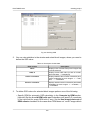
8.1. Specifying ground sample distance (GSD) ................................................................... 101
8.2. Creating overlap map ................................................................................................. 103
8.3. Creating vector layers from block layout ...................................................................... 104
8.4. Building pre-regions ................................................................................................... 105
8.5. Working with raster images ......................................................................................... 108
2