1
Gigaset SL56 / IM2 EN / A31008-M1752-R211-2-SM19 / start_guide_time.fm / 26.7.07
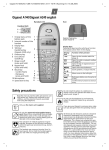
Operating the handset
With the keypad lock activated, only the
emergency number can be dialled, see
page 16.
Control key
Display keys
The function of the display keys changes
depending on the particular operating situation. Example (depending on base station):
?
SMS
1
2
Below, the side of the control key that you
must press in the respective operating situation is marked in black (top, bottom,
right, left, centre), e.g. v for "press
right on the control key".
The control key has a number of different
functions:
When the handset is in idle status
s
w
u
t
Open directory.
Open main menu.
Open list of handsets.
Set handset ringtone
(page 18).
v
Start voice dialling, press and
hold (page 14);
Main menu, press briefly.
In the main menu and in input fields
You can use the control key to move the
cursor up t, down s, right v or
left u.
In lists and submenus
t / s Scroll up/down line by line.
w
Open submenu or confirm
selection.
u
Go back one menu level, or
cancel.
During an external call
s
u
t
Open the directory.
Initiate internal enquiry call
and mute
Adjust loudspeaker volume for
earpiece and handsfree mode.
1 Current display key functions are shown in
the bottom display line.
2 Display keys
The most important display symbols are:
}
Left display key, as long as it
has not been assigned a function (page 16).
©
Open the main menu.
§Options§
Open a context-dependent
menu.
W
Delete key: deletes one character at a time from right to
left.
Î
Go back one menu level or
cancel operation.
Œ
Fetch E-mail address from the
directory.
Ó
Copy number into directory.
Ÿ
On base stations with built-in
answering machines: forward
external call to answering
machine.
•
Open the last number redial
list.
Returning to idle status
You can revert to idle status from anywhere in the menu as follows:
¤ Press and hold the end call key a.
9