1
INSTRUCTIONS
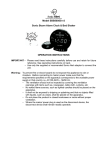
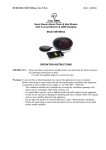
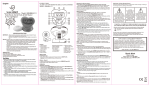
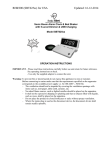
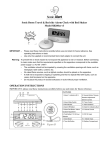
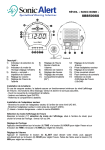
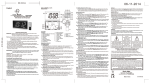
Features show on diagram above:
1. DC adpator input
2. Tone
3. Alarm indicator
4. PM indicator
5. Flashing LED
6. Time Set
7. Hour
8. Snooze / Dimmer
9.
10.
11.
12.
13.
14.
15.
Minute
Alarm Set / Off
Function Switch
Volume Knob
Vibrator out Jack
Battery Compartment door
USB Charging Port
Test Mode:
1) Press and hold the Snooze and Time buttons for 3 seconds to enter the Test
Mode. The display will show "7ES7" to indicate it is in TEST Mode.
2) If within 1 minute no button is pressed, then it will exit the Test Mode and return
back to the Time Mode.
3) Press any button within 1 minute (except the Snooze & Time buttons, which has no
effect), it will exit the Test Mode immediately.
4) While in Test Mode, sliding the Function Switch will demonstrate the different
functions of the clock:
a) Function Switch at OFF, it will have a continuous "Vee" sound to indicate it is in
the Test Mode.
b) Function Switch at BUZZ, it will demonstrate the buzzer sound.
c) Function Switch at VIB, it will demonstrate the vibrator.
d) Function Switch at VIB & BUZZ, it will demonstrate the buzzer sound & the
vibrator.
5) After finish with the Test Mode, press any button (except the Snooze & Time
buttons, which has no effect) it will exit the Test Mode immediately.
Setting the correct time –
1) Press and hold the Time Set Button ( 6 ) at the same time press the Hour Button
( 7 ) to advance the clock display rapidly until the hour is correct.
2) Press and hold the Time Set Button ( 6 ) at the same time press the Minute
Button ( 9 ) to advance the clock display rapidly until the minute is correct.
A lighted dot (4 ) in the upper left of the clock display indicated the time is PM. For
AM time indication, the dot does not light up.
Setting the alarm time –