1
E N G LISH
User manual
1
1.1
1.2
Welcome
Product highlights
What's in the box
4
4
4
2
2.1
2.2
2.3
Important
Safety
Disposal of your old product
Technical support and warranty
5
5
5
5
3
3.1
3.2
Get started
6
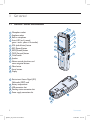
Overview – controls and connections 6
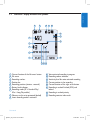
Overview – display indicators and
symbols
7
3.3 Install the batteries
8
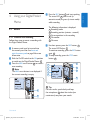
3.4 Insert and eject the memory card
8
3.5 Format a new memory card
9
3.6 Activate the Digital Pocket Memo
9
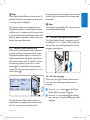
3.6.1 Set the language
9
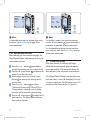
3.6.2 Set the date and time
10
3.7 Power-save mode
10
4.3
4.3.1
4.3.2
4.3.3
Delete
Delete a file
Delete part of a recording
Delete all dictations
5
Use more of your Digital Pocket
Memo
17
Use Philips SpeechExec software
17
Advanced configuration
17
Download recordings to the PC
17
Menu settings
18
Use voice-activated recording
19
Work with index marks
20
Insert an index mark
20
Delete an index mark
20
Delete all index marks
20
Assign an author's name
21
Use rechargeable batteries
21
Recharge the batteries using the
Philips power supply
21
Recharge the batteries through the
docking station
21
5.1
5.1.1
5.1.2
5.2
5.3
5.4
5.4.1
5.4.2
5.4.3
5.5
5.6
5.6.1
5.6.2
4
4.1
4.1.1
4.1.2
4.1.3
4.1.4
4.1.5
4.1.6
4.2
4.2.1
Using your Digital Pocket Memo
Record
Create a new recording
Review recording
Add to a recording (insert)
Finish (lock) a recording
Change the recording format
Adjust the microphone sensitivity
Playback
Overview playback functions
User manual
dpm9370_ifu_en-de-fr-es-nl-it.indb 3
11
11
11
12
12
13
13
14
14
15
6
Technical data
15
15
16
16
22
3
28.05.2008 17:16:58