1
5. Main menu
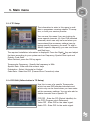
5-2-3 Time Adjustment
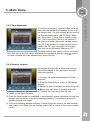
To set the current time, input the offset value by
using the standardized information of your current service area. The time setting will be used as
the standardized time for the TV Guide, Wake
up / Sleep time. Current time is based on the
TDT (Time Description Table) in the stream of
the current program (Automatic Update should
be ON). If the stream of current service doesn't
contain the TDT, you can adjust current time
after you set up Automatic Update to OFF.
To adjust current time, move a cursor to Current
Time and then press OK button. Afterward you can adjust time by using , button.
You can complete the time adjustment by press OK key.
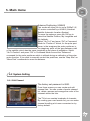
5-2-4 Receiver Upgrade
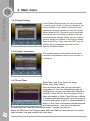
All program and/or data in the master receiver
can be transferred to the next(slave) receiver
using this function.
1) Connect the serial cable between the two
receivers.
2) Enter the Data Transfer menu on the Master
receiver.
3) Select the type of transfer you wish using the
, keys. You can select to transfer both Software & channel list, Software only or Channel list only and press OK key.
4) Power on the Slave Receiver.
5) Once the data transfer is completed, a message will appear informing you that the
transfer was successful. If an error message appears, you will need to start the
transfer process over again.
6) If you are updating multiple receivers, transfer the serial cable to the next receiver
and power it on. When you are finished, press EXIT to return to the cancel viewing
mode.