1
78
Creating Custom Post Types
When we created our custom post type, WordPress automatically created some new hooks for using the type’s slug, which we
defined as “businesses.” We’re using one of those hooks, namely
manage_edit_businesses_columns, to modify the columns of the
admin display. You can find an awesome list of all of WordPress’s
hooks over at http://adambrown.info/p/wp_hooks/hook. Just
replace {$post_type} with the slug of your custom post type.
In our callback function, business_manager_edit_columns(),
we redefine the default array that WordPress uses for the columns,
aptly named $columns, without our own key => value pairs. The
keys are how we’ll reference that column, the values are the labels
that user sees. Next, we’re going to apply some values to those
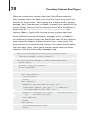
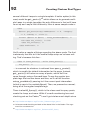
columns. Add this to business-manager.php:
add_action("manage_businesses_posts_custom_column",
"business_manager_custom_columns");
function business_manager_custom_columns($column){
global $post;
$custom = get_post_custom();
switch ($column)
{
case "description":
the_excerpt();
break;
case "address":
$address= $custom["address"][0].'<br/>';
if($custom["address_two"][0] != "") $address.=
$custom["address_two"][0].'<br/>';
$address.= $custom["city"][0].', '.$custom["state"]
[0].' '.$custom["zip"][0];
echo $address;
break;
case "phone":
echo $custom["phone"][0];
break;
▶