1
User Instructions for Deymed
Brainfeedback 3
Brainfeedback 3 ver. 11.02.XXX
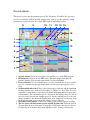
Brainfeedback 3 screen:
1.
2.
3.
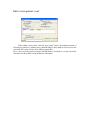
1. Add or Edit patient’s card button: New Patient button: Opens the “Work with
Patient’s Data” dialogue box for a blank patient. Edit Patient’s Card button: Opens
the “Work with Patient’s Data” dialogue box for the currently selected patient. See the
New Patient Card section below.
2. Patients List: Shows the current patients in the system sorted alphabetically
ascending by surname.
3. Patient Recording List: Shows the recordings available in the system for the
currently selected patient.