1
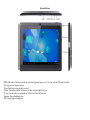
External Buttons
MINI USB- makes USB devices usable on your tablet (keyboard, mouse, etc.). Use your included OTG cable to do this.
DC- plug your wall charger into here.
Power- Hold down to turn the tablet on or off.
Volume- Pressing the top half will increase volume, the bottom half will lower.
TF card- Your hard drive is expandable to 32GB. Insert a MicroSD card here.
Earphone- Plug in headphones here.
MIC- Do not plug in anything here.