1
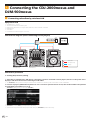
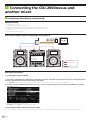
 Connecting the cables (LAN cable and audio cables)
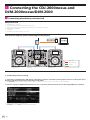
Connect the LAN cable and audio cables.
Connect in such a way that the channel number of the DJ mixer’s LAN cable insertion port and the channel number of the terminals to which the audio cables are connected
are the same number.
Connect the computer to [COMPUTER1] or [COMPUTER2].
Ex.: When player 2 is connected to [CH2], player 3 is connected to [CH3] and the computer (Mac/Windows) is connected to [COMPUTER1]
PHONO
L
SIGNAL GND
R
CH 3
CD
LINE
CD
L
LINE
CHL 3CD
POWER
AUDIO OUT
R
CONTROL
L
OFF
ON
DIGITAL
OUT
POWER
R
R
MASTER1
L
1GND
2HOT
MASTER2
L
CH 4
REC OUT
BOOTH
R
3COLD
(TRS)
CH 3
R
CH 1LINK
CH 2
R
R
SIGNAL GND
CD
COMPUTER 1
L(MONO)
R
AUDIO OUT
CD DIGITAL
R
CONTROL
L
DIGITAL
OUT
R
CH 3
CH 1
RETURN
COMPUTER 1
MIDI OUT
L(MONO)
LINK
USB
USB
LINK
-6dB -3dB 0dB
CH 4
R
MASTER
ATT.
CDJ-2000
CH 1
PHONO
L
CONTROL
CD DIGITAL
SEND
L
CH 1
POWER
IN
O)
USB
AC IN
DIGITAL
OUT
CONTROL
CD DIGITAL
CD DIGITAL
R
LINK
CH 2
CH 2
CH 4
CH 2
CDJ-2000
DJM-2000
Checking the connections
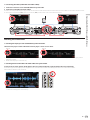
Checking the DJ player’s link established by LAN connection (for the CDJ-2000)
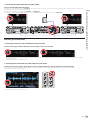
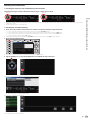
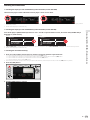
Check that the player number indicated on the DJ player’s screen is lit in white.
LINK OK
LINK NG
! If the player number indicated on the DJ player’s screen is lit in gray, the link is not established. If there is a DJ player for which the player number is lit in gray, redo the
connection procedure.
! Set the second DJ player on in the same way.
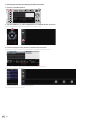
Checking the DJ player’s link established by LAN connection (for the CDJ-900)
Connecting the CDJ-2000/CDJ-900 and DJM-2000nexus/DJM-2000
CONTROL
CD DIGITAL
CH 4
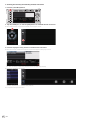
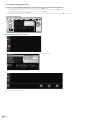
Press the DJ player’s [MENU/UTILITY] button for over 1 second to open the UTILITY screen, then check that [CONNECTED] is
displayed for [LINK STATUS].
LINK OK
UTILITY
PLAYER No.
LINK STATUS
AUTO STANDBY
MIDI CHANNEL
LINK NG
UTILITY
PLAYER No.
LINK STATUS
AUTO STANDBY
MIDI CHANNEL
2
CONNECTED
ON
–
2
NOT CONNECTED
ON
–
! If [NOT CONNECTED] is displayed, the link is not established. If there is a DJ player for which [NOT CONNECTED] is displayed, redo the connection procedure.
! Set the second DJ player on in the same way.
Checking that the LAN cable and audio cables are synchronized
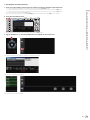
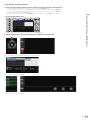
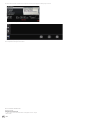
Load a music file, then operate the DJ players that are connected by link to play and pause the track repeatedly.
Check that the player number displayed on the DJ player’s screen is the same as the channel number that lights on the DJ mixer’s channel level indicator.
If the numbers are different, fix the connections.
CD
/DIGITAL PHONO USB 1/2
CD
/DIGITAL
TRIM
USB 3/4
LINE
TRIM
OVER
+9
HI
OVER
+9
10
HI
7
+6
-26/
4
2
2
1
1
0
+6
-26/
-1
MID
-3
ISO
CDJ-2000
-5
+6
-26/
-7
-2
EQ/
-3
ISO
-5
+6
-26/
- 10
LOW
- 15
- 24
- 24
dB
FILTER
CDJ-900
-7
- 10
LOW
- 15
+6
-26/
0
-1
MID
-2
EQ/
10
7
4
dB
+6
-26/
FILTER
DJM-2000
! Set the second DJ player on in the same way.
En
21