1
Integra Console
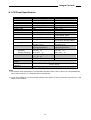
LCD Panel Specification
Specifications
Active Display Area
Pixel Pitch (mm)
Resolution
Color Pixel Arrangement
Display Mode
Brightness(cd/m^2)
Contrast Ratio
Display Color
User Control
Input Signal
15” LCD Panel
304.1 x 228.1 (mm)
0.297 (H) x 0.297 (V)
1024 x 768 @60/70/75Hz
RGB vertical strip
normally white TN
250(cd/m2)@8mA
350:1
16.7M (8 bits)
OSD Control (auto saving)
RGB analog, H/V separate
Plug-n-Play VESA
Power Consumption
VESA DDC 1/2B
33W typical, normal operation
Viewing Angle
-60~60(H)
-55~45(V) (Typ.)
2 CCFLs
edge-light(top/bottom)
Backlight Unit
Temperature
Operating
Storage (Shipping)
Operating Humidity
Non-Operating Humidity
Power Supply Input
Voltage
Power Supply Input
Frequency
Approval
17” LCD Panel
337.920 x 270.336 (mm)
0.264 (per one triad) x 0.264
1280 x 1024
R.G.B. Vertical Stripe
Normally White
260 (center) @ 7mA
450:1 (Typ)
262K colors (RGB 6-bits data)
OSD Control
Even/Odd R/G/B data,
ey sync signal, Clock
VESA DDC 1/2B
25W typical,
(w/o Inverter, All black pattern)
-80~80(H)
-80~80(V) (Typ.)
4 CCFLs
edge-light(top/bottom)
0 to +50 (˚ C)
0 to +50 (˚ C)
-20 to +60 (˚ C)
-20 to +60 (˚ C)
Relative Humidity 8% ~ 95%
Relative Humidity ≦95%
(Ta ≦40˚ C)
90% RH
95% RH
Full range, 100V AC to 240V AC
47 Hz ~ 63 Hz
CE, FCC for the product. UL, TUV, CE for power supply
Note:
1) For optimum video performance, VGA resolution should be set to 1024 x 768 for 15” LCD panel and be
set to 1280 x 1024 for 17” LCD panel with low refresh rate.
2) If part of the display is not clear, please activate “Auto Adjust” for the LCD monitor using the four “LCD
Panel Control” buttons.
13