1
Architecture and Performance Implications
In many cases, the resources available on a physical machine exceed the resource requirements
of the virtual machines and associated applications running on the same machine. (Most servers
today are so lightly loaded that even combining multiple applications on a single server doesn’t
exceed the server’s capacity.) So, even though the virtualization overhead may add to the overall
latency (execution time) of applications running on a virtual machine, as long as there are
sufficient physical resources available, the throughput (or data rate) can be comparable.
For example, consider a database where clients are generating a light load of 100 transactions
per second, and each transaction takes an average of 1 millisecond to complete. If running the
same database on a virtual machine causes each transaction to take 1.2 milliseconds to
complete, the database is still be able to process the 100 transactions per second, since the total
CPU resources consumed to perform the 100 transactions still does not fully utilize all of the
available CPU.
However, as with any computer, if you keep increasing the load of applications running in virtual
machines, it is possible to overload the system beyond what the physical resources can sustain,
so that virtual machine performance is adversely affected.
ESX Server 2 Architecture
ESX Server runs directly on a physical server. In doing so, it has direct access to the physical
hardware of the server, enabling high-speed I/O operations as well as having complete resource
management control. The major conceptual components of ESX Server are:
• Virtualization layer—implements the idealized hardware environment and virtualizes
the physical hardware devices including CPU, network and disk controllers, memory
subsystem, and human interface devices. Each virtual machine sees its own set of virtual
devices and is isolated from other virtual machines running on the same physical system.
• Resource Manager—partitions the physical resources of the underlying machine and
allocates CPU, memory, disk, and network bandwidth to each virtual machine.
• Hardware interface components—enable hardware-specific service delivery while
hiding hardware differences from other parts of the system. These components include
the device drivers and the VMFS (VMware ESX Server File System).
• Service Console—boots the system, initiates execution of the virtualization layer and
resource manager, and relinquishes control to those layers. It also runs applications that
implement support, management, and administration functions.
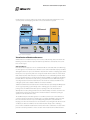
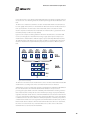
Figure 1 shows the basic architecture of ESX Server 2. As shown in the figure, each virtual
machine has its own guest operating system and applications. The VMkernel and Virtual
Machine Monitor (VMM), shown in the middle band of the diagram, implement the
virtualization layer. The VMkernel controls and manages the physical resources of the underlying
server. The VMM implements the virtual CPUs for each virtual machine. The Resource Manager
and hardware interface components are implemented in the VMkernel.
3