1
Step 5. Saving settings in the instrument memory
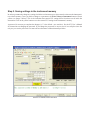
In order to permanently change any settings inside the accelerometer, new values must be written to the instrument’s
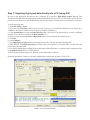
non-volatile memory. Once you make a change to a parameter, the Write Values to Instrument button will turn
yellow (see Image 6 below). This is the indication that current ICU settings differ from those saved inside the
instrument. Click on the yellow button to save the current ICU settings in the instrument’s memory.
A password is necessary to complete the changes (“si” is the default - case sensitive). See the ICU User’s Manual
for instructions on changing the password. If you change the password, be sure to store it in a safe place since the
only way to reset the password is to return the accelerometer to Measurement Specialties.
IMAGE 6: ICU SCREEN, SAVING SETTINGS