1
KY-3000EM Series User’s Manual
Table of Contents
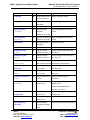
Getting to Know Your Switch ........................................................................ 4
1.1
About the KY-3000EM Series Industrial Switch .............................................................. 4
1.2
Software Features .............................................................................................................. 4
1.3
Hardware Features ............................................................................................................. 5
Hardware Installation..................................................................................... 6
2.1
Installing Switch on DIN-Rail............................................................................................. 6
2.1.1
2.2
Mount KY-3000EM Series on DIN-Rail.......................................................................... 6
Wall Mounting Installation.................................................................................................. 7
2.2.1
Mount KY-3000EM Series on the wall ............................................................................ 7
Hardware Overview........................................................................................ 9
3.1
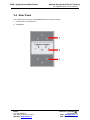
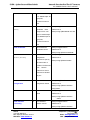
Front Panel .......................................................................................................................... 9
3.2
Front Panel LEDs ............................................................................................................. 14
3.3
Bottom Panel ..................................................................................................................... 15
3.4
Rear Panel ......................................................................................................................... 16
Cables ........................................................................................................... 17
4.1
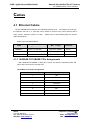
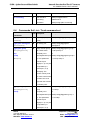
Ethernet Cables ................................................................................................................ 17
4.1.1
100BASE-TX/10BASE-T Pin Assignments ................................................................... 17
4.2
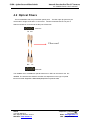
Fibers.................................................................................................................................. 19
4.3
SFP ..................................................................................................................................... 20
4.4
Console Cable................................................................................................................... 20
WEB Management........................................................................................ 21
5.1
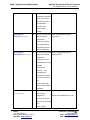
Configuration by Web Browser ....................................................................................... 21
5.1.1
About Web-based Management ...................................................................................... 21
5.1.2
System Information ........................................................................................................ 23
5.1.3
Front Panel...................................................................................................................... 23
5.1.4
Basic setting.................................................................................................................... 24
5.1.4.1
Switch Setting ....................................................................................................... 24
5.1.4.2
Admin Password ................................................................................................... 25
KUSA
1107 SE Willow Pl
Blue Springs, Missouri 64014
Web 6LWHZZZ.\ODQG86$FRP
Telephone: (219) 595-2631
(816) 988-7861
Email: Sales@KUSA1.co
FAX: (480) 287-8605
2631