1
1. Getting Started
Switch
your
Mobile
Phone ON / OFF
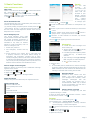
To switch your mobile phone
ON, press and hold the Power
Key until an animation appears
on the screen. Make sure the
battery is charged and inserted
properly.
To switch OFF, press and hold
the Power Key until a window pops up.
Tap Power Off and the phone will shut down.
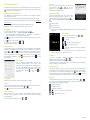
Install / Remove the SIM Card
Make sure to switch off the device and disconnect from
charger before installing and removing the SIM card. To install
/ remove the SIM card, perform the following:
1. Carefully insert the SIM card into the SIM card slot,
making sure that the card’s gold plate is facing down and
in proper alignment with the phone’s metal contacts.
✐✐ If the screen displays that the SIM card is locked
permanently, please consult your network operator.
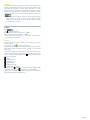
Install / Remove the Memory Card
1. The Memory Card is a handy mobile storage device that
expands the mobile phone’s storage capacity. To install /
remove the memory card, perform the following:
2. Tap and hold the Power Key to shut off the mobile phone.
Carefully insert the Memory Card into its slot, make sure
that the card’s gold plate is facing down and in proper
alignment with the phone’s metal contacts.
✐✐ It is vital that you restart your phone for it to identify with
the newly inserted memory card.
code and then confirm by tapping the OK key. To access the
phone’s settings for these codes, go to
MenugSettingsg SecuritygSet up SIM card loc gSIM card
lock settingsgLock SIM CardgSIM PIN(Input 4-8 digitals)
gOK
Personal Identification Number (PIN)
Local network service providers assign each SIM card with
a unique set of codes including the PIN, PIN2 and PUK. If
the PIN is incorrectly entered for three successive times, the
SIM card will be locked. To unlock the SIM card, you need
to enter the PUK or the Personal Unlocking Key. For further
information regarding PIN, PUK and SIM Lock, contact your
network service provider.
Basic Troubleshooting for locked SIM card
Enter the correct PUK. You will then be prompted to enter a
new PIN.
Type in the new PINgOK.
Re-type the new PINgOK.
PUK
The PUK (Personal Unlocking Key) code is required in order
to modify a blocked PIN. This code usually comes with the
SIM card upon purchase. Otherwise, contact your local
service provider.
✐✐ If you enter the wrong PUK code for 10 consecutive times,
the SIM card will become invalid.
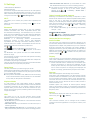
Charge the Battery
1. Plug the charger into the electrical outlet.
2. Connect the small end of the charger connector into the
mobile phone’s charging slot.
When charging is complete, disconnect the phone from the
charger.
▲▲ Do not forget to unplug the charger from the electrical
outlet after charging.
✐✐ You can use the phone while charging; note that charging
time may increase.
Switch to Sleep Mode / Lock Your Phone
The Sleep Mode suspends your device to a low power
consumption state in order to prolong battery life. Your
device also goes into Sleep Mode by itself when the display
automatically turns off after a certain period of time,
depending on display settings.
Press the Power Key to switch to Sleep Mode
✐✐ Switching the Phone to Sleep Mode is a way to lock your
phone.
Wake Up / Unlock Your Phone
Press the Power Key to activate your screen display.
Drag the icon to the right.
✐✐ To set Screen Lock pattern, go to
MenugSettingsgSecuritygScreen Lockgchoose
screen lock
Security Codes
The mobile phone and the SIM card support several
passwords in order to prevent misuse. When prompted to
enter any of the codes mentioned below, type in the correct
Page 3