1
111 W. San Antonio Street, Suite 210-5
New Braunfels, TX 78130
Fax. (866) 434-3498
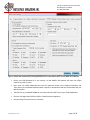
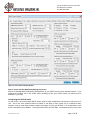
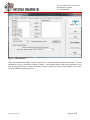
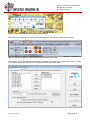
Figure 14: Visual Tab on Settings Window
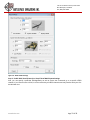
Step 3: Ensure your Site/App/Entity Settings are Correct
Ensure the Site/App/Entity matches the Site/App/Entity of your VRSG Visual (out-the-window) instance. If you
selected the ‘Enabled' box in the VRSG Visual (ownship) section your VRSG window you should now be
attached to your entity.
Interpreting the HUD (Aircraft)
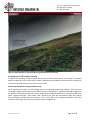
For this section, we have loaded a MACE mission south of Kabul, Afghanistan and locked our view onto an A10C. One of the more powerful features of MACE is the ability to take control over a constructive entity,
transform it into a virtual entity, and then send it back again, all using your HOTAS. This is described in more
detail in the MACE User's Manual. The HUD makes man-in-the-loop flight and weapons delivery much more
www.bssim.com
Page 14 of 26