1
INTRODUCTION:
The MultiSensor family provides a very low cost solution for the need to monitor, measure, record and alarm,
remote parameters. MultiSensors are not designed for high degrees of accuracy, but are intended more as
relative indicators of the conditions they monitor. At this time there are five (5) variants of MultiSensor;
Temperature only, Temperature plus Humidity, Temperature plus Light Intensity, Temperature plus DC voltage
and Temperature plus AC Current.
The MultiSensor family of products is designed to operate on the 1-wire™ bus structure, and as such, have
many identical functions as well as unique functions. This document will address the similarities first.
Common Features:
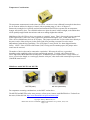
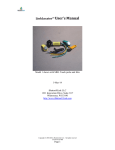
All MultiSensor products are contained in a plastic box with mounting flanges. There is a RJ-45 connector on
either end of the unit. This facilitates a simple connection of the sensor to +5 volts and ground on the 1-Wire®
bus using cat 5E cables. The other connector provides a connection for the next sensor/device in the same
manner. There is no polarity, or order to consider. The 1-Wire slaves are in parallel to one another. Pin
assignments for the RJ-45 connectors are shown in appendix #1.
The RJ-45 jacks will accept RJ-12 plugs as well. NOTE: These devices are not Ethernet compatible.
The enclosures are not weather proof. They are intended for indoor use and to protect the electronics from
coming in contact with external items that might cause failure or damage. The enclosure also provides for
convenient mounting.
All models of MultiSensors have the ability to measure temperature. As a necessary result, the enclosures have
a cutout in the side to facilitate airflow to the sensing device. The opening is screened over to deter insects, or
other foreign materials.
Schematics for Multi-Sensor and all it’s variants, are available on this website by clicking on “Sensors”, and
then selecting “MultiSensor Schematic”.
The ADC used in all MultiSensors is a DS2438. Detailed information on this device can be found on this web
site by selecting “Information and Documentation”. Then select application note “775” or select application
note “524”. The latter will take you to the Dallas/Maxim web site and access to all of their application notes.
How to Read MSxx Products is a valuable application note which can found on this web
site by selecting “Information and Documentation”. Then select application note
“AN0001”.
Copyright© 2005 by iButtonLink, LLC.
iButton and 1-Wire are trademarks of Dallas Semiconductor Corp, Dallas, Texas, USA
Page 2 of 11