1
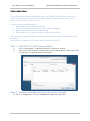
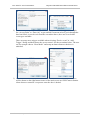
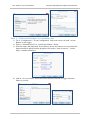
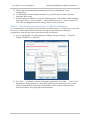
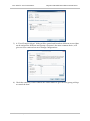
HOW TO – Axis CommunicationsIntegration Guide AXIS Camera Station and AXIS A1001 Introduction The following document highlights how to add AXIS A1001 access control to Axis Camera Station and then complete further configurations that can be made to meet an operator’s need: The document explains how to: Add A1001 to Axis Camera Station. Receive notifications when the door status changes Add control buttons to a camera view Give suitable user permissions to different operators This following configuration has been tested with the following products and firmware: AXIS A1001, firmware 1.25.2 and Axis Camera Station 4.2. Step 1 – Add A1001 to AXIS Camera Station 1) 2) Go to “Configuration”/ “Add/Edit Aux Devices” and choose “Search…” Select access control when it is found by the search to add the device to the system. Once it’s added give it a name the operator can relate to. Step 2 – Receive notification when the door status changes 1) Go to “Configuration”/ “Event Configuration” and create a new rule. Rev: 1.0, Last updated: 27/05/2015 2