1
Mode of operation
What to do in case of alarm
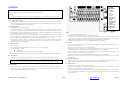
The RadAl™-1 has two keys (pushbuttons) on the bottom and three LEDs (Light Emitting Diodes) on the top.
The two keys have the following functions:
False alarms happen, due to the statistical nature of radioactive decay and of cosmic ray events. The
RadAl™-1 has been designed with the optimal compromise between sensitivity and accuracy, but for your peace
of mind, you should first always presume that any alarm could be a false alarm.
1.
ON/OFF KEY
(red)
In normal operation, turns on and off the instrument. If an alarm has been declared, or if in calibration
mode, pressing this key once will reset the alarm and return the RadAl™-1 to normal operation.
2.
CALIBRATE KEY
(black)
Enters self-calibration mode, in which the instrument measures the ambient background and stores this data
in permanent memory. If an alarm has been declared, pressing this key once will reset the alarm and return
the RadAl™-1 to normal operation. Pressing this key again during calibration mode also will return the
instrument to normal operation, interrupting the self-calibration process.
Press the CALIBRATE button once at installation and then at periodic intervals (recommended once a month)
in order to adjust to long term changes in ambient background.
Note that the calibration process takes ten minutes time. You can interrupt the calibration process any time
by pressing either key.
Note that both keys can be disabled by a command through the communication ports in order to prevent
unauthorised interference with the instrument.
The three LED's have the following functions:
1.
GREEN LED: ON
Always ON in normal
2.
YELLOW LED: COUNT
operation, will flash during calibrations and turn off in case of instrument failure.
Will flash every 20 counts measured by the GM radiation detectors. Use it to visually verify operation of the
instrument and as an aide in identifying any radioactive material brought in the vicinity.
If perfectly shielded, the RadAl™-1/1 will flash every 20 seconds minimum on average (RadAl™-1/2 every
10 and RadAl™-1/4 every 5 seconds). Higher count rates (up to one per second on average) are acceptable as
due to ambient background.
3.
RED LED: ALARM
A pattern: long dash - short pause (0.8 seconds ON, 0.2 seconds OFF) indicates a radiation alarm
A fast blinking pattern (0.2 seconds ON, 0.8 seconds OFF) indicates an electronic failure.
The RadAl™-1 also has an internal buzzer that will beep with the same pattern of the ALARM LED, and a
relay that will be actuated when an alarm condition is asserted.
All the LED's, the buzzer and the relay can be individually disabled using jumpers, as explained below.
Setting the alarm threshold
The RadAl™-1 sets its alarm threshold automatically, based on ambient background. An internal jumper allows
to start the auto-calibration manually (default) or to have the instrument TRACK the ambient background
continuously.
In some cases you may want to set a higher alarm threshold, for example when small amounts of radioactivity
may be acceptable and false alarms are to be strongly avoided.
In order to set a higher alarm threshold, you may place a known radioactive source at a chosen distance, then
press the CALIBRATION key. Subsequently, and after the source is removed, the RadAl™-1 alarm will trigger only
for radiation levels significantly higher than produced by the calibration source used. This feature only works
when NOT in background TRACK mode (default: see CONFIGURATION section). Consult your distributor for
purchasing calibration sources.
You can also set the alarm level using computer communications: refer to COMMUNICATION - COMMANDS for
programming information and to SPECIFICATIONS for the count rate to dose rate proportionality factor.
You can also use install Jumper 5-4 to reduce sensitivity: see CONFIGURATION section.
RadAl201 12-Jan-12 ©LQC 1998-2012
"True" false alarms can be caused, for example: by the passage of persons undergoing therapy with radioactive
substances; by sudden weather changes (rain, for example, brings rapidly to the ground nuclides collected in the
upper atmosphere); by the discontinuous operation of heating and air conditioning systems (they can redistribute
Radon collected on air filters).
If an alarm is declared, do not panic: the RadAl™-1 is extremely sensitive: even radiation levels millions of times
higher than is sufficient to trigger an alarm can be harmless - if taken for only short periods of time. Follow these
directions unless otherwise instructed by safety or security personnel.
Close all doors and windows, restrict access, and if possible recall and limit movement of all persons and
goods that recently passed by the area.
Reset the alarm manually (press either button). Wait up to ten minutes. If during ten minutes no new alarm
is triggered, then the alarm was due to a random event (probably a cosmic ray shower). Ignore the event.
If an alarm is declared spontaneously again, you probably really have a radiation source in the vicinity.
Observe the yellow (COUNT) LED and try to identify the radioactive source by moving objects towards the
RadAl™-1. Radioactive sources will increase the frequency of the yellow flashes. If you succeed in
identifying the radioactive source, move it away from people and if possible cover it with a plastic cover to
prevent dispersion of radioactive dust, then notify the proper authorities.
NOTES:
If false alarms recur frequently (more than once a week), and you are not in TRACK mode, your ambient
background has probably increased: press CALIBRATE once to adjust to the new background.
If in TRACK mode, the threshold may be rising during the time a radioactive source is presented to the
instrument. In such circumstances, the alarm condition may clear, with a radioactive source still present. In
these circumstances, observe the yellow COUNT LED to identify the presence of radioactive material.
Use of a hand-held radiation detector is recommended for easy detection of a radiation source. Consider
purchasing one from your distributor.
Testing
It is not necessary to use radioactive sources to calibrate or test the RadAl™-1. Natural background is used for
calibration, and built-in diagnostics will inform you in the event of a failure.
If you observe the yellow COUNT LED you will notice that it pulses at random intervals, typically two to twenty
seconds apart in the RadAl™-1/1 and one half to five seconds apart in the RadAl™-1/4. Each pulse indicates
that 20 counts were produced by the GM tubes: this gives you an indication of correct operation and of the level
of the natural background.
You may still want to purchase weak radiation sources for verifying the correct operation of the instrument. It is
legal to own and use sources of very low intensity. You can purchase such sources from many suppliers: call your
distributor if you need help in purchasing radioactive test sources.
Under normal background conditions, the RadAl™-1/1 will signal alarm in the presence of a 1 µCi Cs137 source
at 25 cm distance and the RadAl™-1/4 at 50 cm distance.
NOTE: You can set and reset an alarm condition using communications from an external computer. You may
want to use this feature if the instrument is integrated in an alarm system that requires periodic testing.
NOTE: as a safety precaution, the maximum natural background level accepted (in calibration or in TRACK
mode, with the SHORT option - Jumper 5-5 - not set) by the RadAl™-1/1 is about 1 mR/h (10 µGy/h); by the
RadAl™-1/4 it is about 0.25 mR/h (2.5 µGy/h). Higher "background" levels will always trigger an alarm (or an
error condition if attempting calibration). With the SHORT option set, values are 6 and 1.5 mR/h respectively.
Page 2
http://radal.com
REV 2.06