1
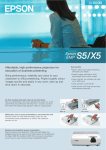
LCD Projector User Guide
Connecting the Projector
PC / MAC
PC/MAC connection to the
computer monitor prot
S-Video
to the S-Video out port
S-VIDEO
VIDEO AUDIO
AV
Video
to the Composite video out port
~
100V
Audio
to the source’s Audio out port
240V
Power cord connection to an
electrical outlet
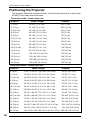
The cables are color coded to assist you with making the connections.
When you connect the power cable to the projector, the Power light on the
keypad begins to blink.
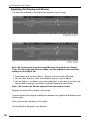
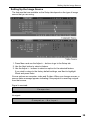
You can connect more than one image source at a time. Use the Setup tab on
the menu screen to select which image source you want to view. See “Setting
Up the Image Source” on page 13.
If you are using an older MACINTOSH computer, you might need to use the
MACINTOSH adapter that was included with your projector.
Warning:Always turn off the image source (computer or video source)
and projector before connecting or disconnecting cables.
6