1
PROFIBUS
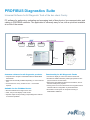
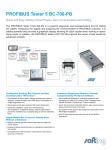
PROFIBUS Tester 4
Quick and Easy Testing of Bus Physics and Bus Communication
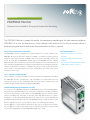
The PROFIBUS Tester 4 is a powerful tool that allows extensive testing of PROFIBUS segments during
operation. It can also test the bus – or individual devices of interest – even with no PLC running.
ALL IN ONE
CUSTOMER BENEFITS
The PROFIBUS Tester 4 combines a signal tester, a storage oscilloscope, a protocol
> Combines the diagnostic functions of
analyzer, and a master simulator into a single tool. This tool is designed for use
in a wide range of applications – from setup and commissioning, documentation,
acceptance testing, and optimization to preventive maintenance, troubleshootings
and laboratory tests. In addition, the PROFIBUS Tester 4 can be used without a
notebook and is able to run comprehensive network tests in stand-alone mode.
ALSO SUITABLE FOR LESS EXPERIENCED USERS
With a single mouse click (PC mode) or a single push of a button (stand-alone mode) a
user is able to initiate a full examination of a PROFIBUS network including automatic
signal and protocol analysis. A summary of all results is displayed to the user in a very
intuitive manner. In PC mode, the software package has been design to emphasize
the all-important ease-of-use aspect while at the same time preserve the more indepth diagnostic features required by networking experts. This makes the tool ideal
for both less experienced users and fieldbus specialists.
INTUITIVE USE AND CLEAR READINGS
The PROFIBUS Tester 4 automatically detects the baud rate or open circuit voltage
immediately after connection to the PROFIBUS. In stand-alone mode, the bus can be
tested using the Live Status functionality. Up to ten quick tests and a trend recorded
over maximum 41 days can be saved in the test tool and imported into the PC later.
The PC software provides many additional features for executing, analyzing, and
managing bus tests. A status bar continually shows the current bus state. Using the
Network Status function, the bus can be tested with a Quick Test or a User-Controlled
Test. The Topology Scan feature determines the overall cable length and the cable
length between slaves. The test results can be documented in a detailed test report.
The Long-Term Trend view is used for detecting sporadic faults. In the Oscilloscope
and Frame Analyzer views, experts can perform in-depth, detailed analysis. For bus
and device tests with the integrated master simulator, only the baud rate needs to be
specified – no configuration or parameterization is required.
previously separate tools in one product
> Full bus testing even without a
notebook
> Very easy to use, delivering fast and
reproducible test results